透析QTP自动化测试框架SAFFRON
1、为什么要使用框架?
框架是一组自动化测试的规范、测试脚本的基础代码,以及测试思想、惯例的集合。可用于减少冗余代码、提高代码生产率、提高代码重用性和可维护性。例如QTestWare就是QTP自动化测试框架中的一类。
2、SAFFRON简介
SAFFRON是针对Web开发的一个简单的QTP测试框架原型,是Adam Gensler于06年写的,需要QTP 9.1版本以上。完整的SAFFRON脚本代码可到以下地址获取:http://www.itestware.com/ctest/index.php?option=com_content&view=article&id=62:webqtp-saffron&catid=35:testing_is_believing
3、如何使用SAFFRON?
SAFFRON框架以外部VBS文件的形式出现,因此使用方法比较简单,直接在测试脚本中以资源形式导入即可使用,如图所示:

导入后,可在“Available Keywords”视图中看到SAFFRON的所有函数,如图所示:

选中某个函数,拖拽到专家视图的编辑器中,如图所示:

后接一个URL地址,例如“http://www.itestware.com”,即可使用SAFFRON框架中的BrowseTo函数导航到指定的URL地址,如下脚本所示: 'BrowseTo(url) BrowseTo "http://www.itestware.com"
4、SAFFRON框架代码剖析
为了深入了解SAFFRON,以及框架的使用方法,下面我们将分别介绍SAFFRON中的主要函数,对SAFFRON代码进行深入剖析。
4.1 导航到指定URL
SAFFRON使用名为BrowseTo函数来负责导航到指定的URL,如果浏览器尚未启动,则先调用函数Launch来打开浏览器。BrowseTo函数的定义如下所示: Public Function BrowseTo (url) thirdlevel = "" Report micPass, "Navigate to URL", "Navigating to URL: " & Quote(url) If initialized Then Execute GenerateDescription("Browser") & "Navigate " & Quote(url) Else Launch "website", url End If Reporter.Filter = rfDisableAll End Function
在脚本中,会判断是否初始化了浏览器,如果有则执行导航动作,导航到指定的URL。导航动作是执行这行脚本来完成的: Execute GenerateDescription("Browser") & "Navigate " & Quote(url)
Execute是一个用于执行指定VBScript脚本语句的函数,GenerateDescription函数的定义如下所示: ' Generates a generic description based up on the "level" viarable ' levelstr - will be one of the values that is in the level array ' returns - string representative of the object hierarchy Public Function GenerateDescription (levelstr) l = IndexOf(level, levelstr) If l >=0 Then fdesc = level(0) & "(" & Quote(desc(0)) & ")." If l >= 1 Then fdesc = fdesc + level(1) & "(" & Quote(desc(1)) & ")." If 2 >= l Then If thirdlevel <> "" Then fdesc = fdesc + level(2) & "(" & Quote(desc(2)) & "," & Quote("name:=" & thirdlevel) & ")." End If End If End If End If GenerateDescription = fdesc End Function
4.2 返回测试对象的描述
GenerateDescription函数用于返回对象的描述性语句,例如,指定Browser,则返回如下语句: "Browser("micclass:=Browser")."
该语句代表了当前浏览器对象,并且后面加了个点号,这是为了方便后接"Navigate "这个浏览器对象的导航操作,以及指定的URL字符串,例如"http://blog.csdn.net/testing_is_believing"。在Execute时,其实执行的VBScript语句如下所示: Browser("micclass:=Browser").Navigate "http://blog.csdn.net/testing_is_believing"
经过SAFFRON的框架封装后,则只需要使用如下语句即可达到同样的效果: BrowseTo "http://blog.csdn.net/testing_is_believing"
4.3 启动浏览器
SAFFRON使用名为BrowseTo函数来负责导航到指定的URL,但是如果浏览器未启动,则会先调用函数Launch来打开浏览器。Launch函数的定义如下所示: prepares the framework for usage, and configures all internal framework ' variables and structures ' apptype - used to launch different types of applications based ' upon different technologies -- currently there is only web ' val - string that represents what to launch ' returns - always returns true Public Function Launch (apptype, val) If "website" = apptype Then thirdlevel = "" Report micPass, "Initialize", "Initializing Framework" level = split(webLevels, leveldelimiter, -1, 1) desc = split(webLevelsDesc, leveldescdelimiter, -1, 1) object = split(objects, objectdelimiter, -1, 1) objectDescription = split(objectsDescription, objectsDescriptiondelimiter, -1, 1) CloseBrowsers Set IE = CreateObject("InternetExplorer.Application") IE.visible = true IE.Navigate val While IE.Busy wait 1 Wend End If initialized = true Launch = true End Function
可看到脚本中创建了IE的COM对象,然后设置IE的Visible属性设置为Tue,让浏览器可见,然后调用IE对象的Navigate方法导航到指定的URL。除了创建IE的COM对象外,在Launch函数中还进行框架其它方面的初始化。
4.4 给指定字符串前后加双引号
在BrowseTo函数的定义脚本中,调用了一个名为Quote的函数,该函数的定义如下所示: ' generates a string with embedded/surrounding quotes Public Function Quote (txt) Quote = chr(34) & txt & chr(34) End Function
该函数的作用是给指定的字符串前后加上双引号字符,例如下面代码 Msgbox "The message is " & Quote("hello world!")
执行结果显示如图所示。

如果我们不使用这个函数,则需要这样写我们的代码来实现同样的功能: Msgbox "The message is ""hello world!"""
很明显,这样的写法写出来的代码的可读性和可维护性都差一截。
4.5 点击链接
作为一个针对WEB应用的脚本框架,除了能启动浏览器导航到指定的页面外,还需要针对页面的各种元素进行测试操作,例如链接的点击、按钮的点击操作。在SAFFRON框架中,使用Activate函数来点击链接、按钮,其函数定义如下所示: ' Activates an object based upon its object type ' objtype - the type of object should be limited to values in the object array ' text - identifying text for the control - for a link, it's the text of the link Public Function Activate (objtype, text) localDesc = "" If thirdlevel <> "" Then localDesc = GenerateDescription(level(2)) Else localDesc = GenerateDescription(level(1)) End If
  AutoSync()

  Select Case objtype
  Case  "Link"
   Execute localDesc & GenerateObjectDescription("Link","innertext:=" & text) & "Click"
   Report micPass, "Link Activation", "The Link " & Quote(text) & " was clicked."
  Case "WebButton"
   Execute localDesc & GenerateObjectDescription("WebButton", "value:=" & text) & "Click"
   Report micPass, "WebButton Activation", "The WebButton " & Quote(text) & " was clicked."
  End Select
 End Function
函数首先判断对象的类型,然后根据对象类型分别处理,如果是链接对象,则通过以下语句组合成可执行的VBScript语句,然后用Execute函数来执行: Execute localDesc & GenerateObjectDescription("Link","innertext:=" & text) & "Click"
如果是按钮对象,则组合成: Execute localDesc & GenerateObjectDescription("WebButton", "value:=" & text) & "Click"
在这里,调用了GenerateObjectDescription函数,GenerateObjectDescription函数的作用与GenerateDescription函数的作用类似,都是用于返回一个测试对象的描述,不同的是GenerateObjectDescription函数需要传入测试对象的描述数组,GenerateObjectDescription函数的定义如下: ' Generates an object description based upon the object, and objectDescription arrays ' obj - name of the object in the object array ' prop - additional property to help uniquely identify the object ' returns - a string representative of the object description Public Function GenerateObjectDescription (obj, prop) i = IndexOf(object, obj) ndesc = "" If i <> -1 Then ndesc = obj & "(" & Quote(objectDescription(i)) & "," & Quote(prop) & ")." End If GenerateobjectDescription = ndesc End Function
有了Activate函数,我们在写脚本的时候就可以充分利用,简化脚本的编写,例如下面是两句简单的脚本,分别点击页面上的一个链接和一个按钮: Activate "Link", "Person" Activate "WebButton", "Search"
在Activate函数中,调用了一个名为AutoSync的函数,该函数的作用与QTP的Sync方法是一样的,只是在外面封装了一层,函数定义如下所示: ' waits for the web page to finish loading Public Function AutoSync Execute GenerateDescription("Browser") & "Sync" End Function AutoSync函数用于等待WEB页面加载完成。
4.6 一个小例子
到现在为止,我们可以使用SAFFRON的Launch、BrowserTo和Activate函数来编写简单的脚本启动浏览器,导航到指定的页面,点击链接和按钮,例如下面就是一个综合了这几个功能的脚本: ' 启动浏览器 Launch "website","http://127.0.0.1:1080" ' 导航到“http://127.0.0.1:1080/WebTours” BrowseTo "http://127.0.0.1:1080/WebTours/" ' 点击名为“administration”的链接 Activate "Link","administration"
该脚本调用SAFFRON框架的Launch函数启动IE浏览器,然后导航到“http://127.0.0.1:1080/WebTours”,点击如图所示的页面中名为“administration”的链接。

脚本的测试结果如图所示。

4.7 检查对象是否存在
前面的小例子仅仅实现了启动浏览器、导航、点击链接和按钮的功能,如果要组成一个完整的测试用例,还缺少一些东西,例如检查指定的对象是否存在,在SAFFRON中,用Verify函数来实现这个功能,Verify函数的定义如下所示: ' Verify the Existence of an object ' objtype - values should be limited to values in the object array ' text - multi-purpose argument that indicates what to verify ' - for a link, or button, it's the text of the control ' - for a list, it's the name of the control ' - for a frame, it's the name of the frame Public Function Verify (objtype, text) rval = false localDesc = "" estr = "" If thirdlevel <> "" Then localDesc = GenerateDescription(level(2)) Else localDesc = GenerateDescription(level(1)) End If
    AutoSync()

  Select Case objtype
  Case "Page"
   Execute "rval = " & GenerateDescription(level(1)) & "Exist (0)"
   If rval Then
    Execute "title = " & GenerateDescription(level(1)) & "GetROProperty(" & Quote("title") & ")"
    If title = text Then
     rval = true
    Else
     rval = false
    End If
   End If
  Case "CurrentFrame"
   If thirdlevel <> "" Then
    estr = "rval = " & localDesc
   End If
  Case "Link"
   estr =  "rval = " & localDesc & GenerateObjectDescription("Link", "innertext:=" & text)
  Case "WebButton"
   estr = "rval = " & localDesc & GenerateObjectDescription("WebButton", "value:=" & text)
  Case "WebList"
   estr = "rval = " & localDesc & GenerateObjectDescription("WebList", "name:=" & text)
  Case "WebEdit"
   estr = "rval = " & localDesc & GenerateObjectDescription("WebEdit", "name:=" & text)
  End Select

  If estr <> "" Then
   Execute estr + "Exist (0)"
  End If

  If rval Then
   Report micPass, objtype & " Verification", "The " & objtype & " " & Quote(text) & " was verified to exist"
  Else
   Report micFail, objtype & "  Verification", "The " & objtype & " " & Quote(text) & " was not found"
  End If

  If "True" = rval Then
   rval = True
  Else
   rval = False
  End If

    Verify = rval
 End Function
由于判断不同对象的存在需要采用不同的属性,因此Verify函数中对不同的对象类型进行判断、分别处理。例如,对于Link类型的对象,用innertext属性,对于WebButton,则采用value属性,但是最后都需要组合成一条语句,后接“Exist”,通过Execute方法执行这个语句,从而实现对象是否存在的判断。
对于页面对象(Page)的存在性检查有点不一样,采用的是以下脚本: Case "Page" Execute "rval = " & GenerateDescription(level(1)) & "Exist (0)" If rval Then Execute "title = " & GenerateDescription(level(1)) & "GetROProperty(" & Quote("title") & ")" If title = text Then rval = true Else rval = false End If End If
通过GetROProperty方法获取当前页面的title属性,然后与传入的“text”参数进行比较,如果相等,则认为页面对象是存在的。
在测试脚本中可以这样使用Verify函数: ' 启动浏览器 Launch "website","http://127.0.0.1:1080" ' 导航到“http://127.0.0.1:1080/WebTours” BrowseTo "http://127.0.0.1:1080/WebTours/"
 If Verify ("Link","administration")= False then
  Reporter.ReportEvent micFail,"检查链接","链接不存在"
  Else
     ' 点击名为“administration”的链接
     Activate "Link","administration"
 End IF
脚本中先用Verify检查名为“administration”的链接对象是否存在,如果不存在则提示错误,如果存在则进一步调用Activate函数点击链接。
4.8 在文本框输入字符串
在SAFFRON中,可以使用EnterTextIn函数来给输入框(WebEdit对象)输入字符串。EnterTextIn函数的定义如下所示: ' Enters text into an edit field ' objname - name of the control -- use Object Spy if you don't know what it is ' text - the text to enter into the control Public Function EnterTextIn (objname, text) localDesc = "" rval = true If thirdlevel <> "" Then localDesc = GenerateDescription(level(2)) Else localDesc = GenerateDescription(level(1)) End If
  AutoSync()

  localDesc = localdesc & GenerateObjectDescription("WebEdit", "name:=" & objname)
  Execute localDesc & "Set (" & Quote(text) & ")"
  Report micPass, "Enter Text", "Text: " & Quote(text) & " was entered into " & Quote(objname)
  EnterTextIn = rval
 End Function
例如,如果我们要在如图所示的登录界面中输入用户名和密码,则可以使用SAFFRON的EnterTextIn函数来实现。
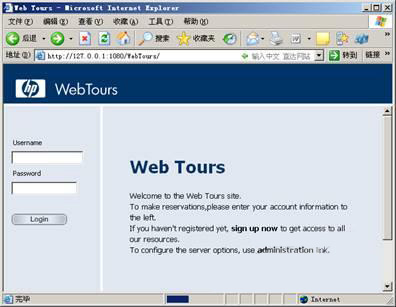
测试脚本可以这样编写: ' 输入用户名 EnterTextIn "username","chennengji" ' 输入密码 EnterTextIn "password","123"
4.9 读取文本框的字符串
在SAFFRON中,可以使用EnterTextIn函数来给输入框(WebEdit对象)输入字符串。对应的有一个名为GetTextFrom的函数,用于读取输入框和文本列表的字符串,GetTextFrom的定义如下所示: ' Obtains text from a control ' objtype - is the type of control the get the text from ' objname - is the name of the control -- use Object Spy if you don't know the name ' returns - the text of the control Public Function GetTextFrom (objtype, objname) text = "" localDesc = "" If thirdlevel <> "" Then localDesc = GenerateDescription(level(2)) Else localDesc = GenerateDescription(level(1)) End If
  AutoSync()

  Select Case objtype
   Case "WebEdit"
    Execute "text = " & localDesc & GenerateObjectDescription("WebEdit", "name:=" & objname) & "GetROProperty (" & Quote("value") & ")"
   Case "WebList"
    Execute "text = " & localDesc & GenerateObjectDescription("WebList", "name:=" & objname) & "GetROProperty (" & Quote("value") & ")"
  End Select
  Report micPass, "Capture Text", "Text: " & Quote(text) & " was captured from the control " & Quote(objname)
  GetTextFrom = text
 End Function
假设我们需要读取如图所示的界面中的“Departure City”和“Arrival City”这两个文本列表(WebList对象)中的字符串,则可以使用GetTextFrom函数。
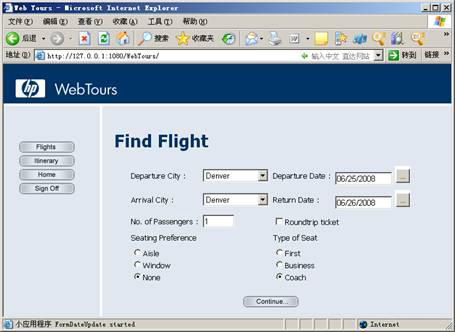
测试脚本可以这样编写: ' 获取航班起始城市 DepartureCity = GetTextFrom( "WebList","depart") ' 获取航班终点城市 ArrivalCity = GetTextFrom( "WebList","arrive")
当然,也可以使用相同的函数来读取文本框(WebEdit对象)的字符串,例如下面的脚本读取“NO. of Passengers”对应的文本框中的字符串: ' 获取乘客数量 PassengerNumber = GetTextFrom( "WebEdit","numPassengers")
4.10选择列表中的一项
在SAFFRON中,可以使用SelectFromList函数从下拉框列表(WebList对象)中选择指定的一项。SelectFromList的定义如下所示: ' Selects a specific value from a listbox, or combobox ' objname - name of the control -- use Object Spy if you don't know the name property ' text - the item in the combobox to select Public Function SelectFromList (objname, text) localDesc = "" rv = "" rval = false If thirdlevel <> "" Then localDesc = GenerateDescription(level(2)) Else localDesc = GenerateDescription(level(1)) End If
  AutoSync()

  localDesc = localdesc & GenerateObjectDescription("WebList", "name:=" & objname)

  Execute "cnt = " & localDesc & "GetROProperty(" & Quote("items count") & ")"
  For i = 1 to cnt
   Execute "rv = " & localDesc & "GetItem (" & i & ")"
   If rv = text Then
    rval = true
   End If
  Next

  If rval Then
   Execute localDesc & "Select " & Quote(text)
  End If
  If rval Then
   Report micPass, "WebList Selection", "The WebList item " & Quote(text) & " was selected."
  Else
   Report micFail, "WebList Selection", "The WebList item " & Quote(text) & " was NOT found."
  End If

  SelectFromList = rval
 End Function
假设我们需要从如图所示的界面中的“Departure City”的下拉框中选择其中一项,则可使用SelectFromList函数来实现。
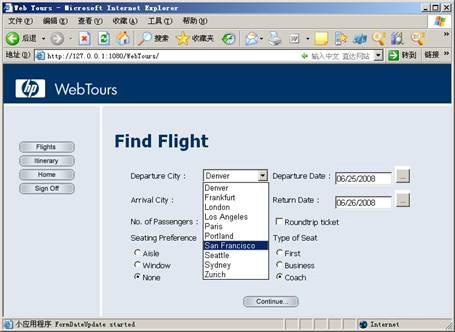
测试脚本可以这样写: ' 选择航班起始城市为"San Francisco" SelectFromList "depart","San Francisco"
4.11 关闭浏览器
Web页面测试的最后一个步骤一般都是关闭浏览器,在SAFFRON中,也把这个过程封装成了一个名为“CloseBrowsers”的函数,该函数的定义如下: ' close all opened browsers Public Function CloseBrowsers If Browser("micclass:=Browser").Exist (0) Then Browser("micclass:=Browser").Close End If While Browser("micclass:=Browser", "index:=1").Exist (0) Browser("index:=1").Close Wend If Browser("micclass:=Browser").Exist (0) Then Browser("micclass:=Browser").Close End If End Function
CloseBrowsers函数会把当前所有打开的浏览器都关闭,脚本中采用描述性编程的方式获取所有对象类型为“Browser”的测试对象,然后循环逐个关闭所有这种类型的测试对象。
5、对SAFFRON框架进行扩展
SAFFRON是一个基本的框架,它封装了浏览器的相关测试操作、封装了一些基本对象的测试操作,例如Link、WebButton、WebEdit、WebList等控件,可用于基本的WEB页面的测试,并且简化了测试脚本的编写,可以让代码的可读性和可维护性得到增强。
但是SAFFRON仅仅是一个基础框架,我们还需要进一步地对其扩展才能应用到实际的WEB自动化测试项目中去,例如扩展对更多的控件的支持。下面是一个对Activate函数扩展Image对象的点击操作的过程:
(1)首先打开SAFFRON框架的VBS文件,找到开头的变量定义处,添加Image对象,让框架可以识别和支持Image对象: ' 扩展对Image对象的支持 objects = "Link|WebButton|WebList|WebEdit|Image" objectsDescription = "micclass:=Link|micclass:=WebButton|micclass:=WebList|micclass:=WebEdit|micclass:=Image"
(2)修改Activate方法,添加对Image对象的Click操作的支持,脚本修改成如下所示: ' Activates an object based upon its object type ' objtype - the type of object should be limited to values in the object array ' text - identifying text for the control - for a link, it's the text of the link Public Function Activate (objtype, text) localDesc = "" If thirdlevel <> "" Then localDesc = GenerateDescription(level(2)) Else localDesc = GenerateDescription(level(1)) End If
  AutoSync()

  Select Case objtype
  Case  "Link"
   Execute localDesc & GenerateObjectDescription("Link","innertext:=" & text) & "Click"
   Report micPass, "Link Activation", "The Link " & Quote(text) & " was clicked."
  Case "WebButton"
   Execute localDesc & GenerateObjectDescription("WebButton", "value:=" & text) & "Click"
   Report micPass, "WebButton Activation", "The WebButton " & Quote(text) & " was clicked."
  ' 扩展对Image类型的按钮的支持
  Case "Image"
   Execute localDesc & GenerateObjectDescription("Image", "alt:=" & text) & "Click"
   Report micPass, "ImageButton Activation", "The ImageButton " & Quote(text) & " was clicked."
  End Select
 End Function
(3)调试和测试修改后的脚本,例如采用下面的脚本来看对Activate函数的扩展是否生效: ' 启动浏览器 Launch "website","http://127.0.0.1:1080" ' 导航到“http://127.0.0.1:1080/WebTours” BrowseTo "http://127.0.0.1:1080/WebTours/"
 ' 输入用户名
 EnterTextIn "username","chennengji"
 ' 输入密码
 EnterTextIn "password","123"

 ' 单击Login按钮
 Activate "Image","Login"

 ' 单击"Flights"按钮
 Browser("Web Tours").Page("Web Tours").Frame("navbar").Image("Search Flights Button").Click

 ' 获取航班起始城市
 DepartureCity = GetTextFrom( "WebList","depart")
 ' 获取航班终点城市
 ArrivalCity = GetTextFrom( "WebList","arrive")
 ' 获取乘客数量
 PassengerNumber = GetTextFrom( "WebEdit","numPassengers")

 ' 选择航班起始城市为"San Francisco"
 SelectFromList  "depart","San Francisco"

 If Verify ("Link","administration")= False then
  Reporter.ReportEvent micFail,"检查链接","链接不存在"
  Else
     ' 点击名为“administration”的链接
     Activate "Link","administration"
 End IF
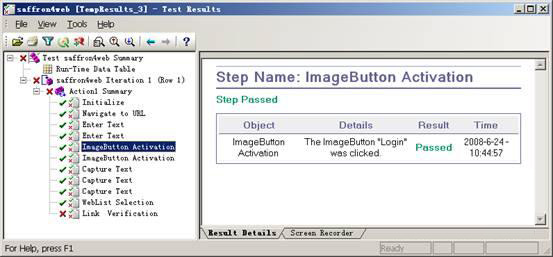
脚本的测试结果如图所示: